Wraith
◆ GPU-rendered · built from scratch in Rust

The memory scanner
that keeps up with you.

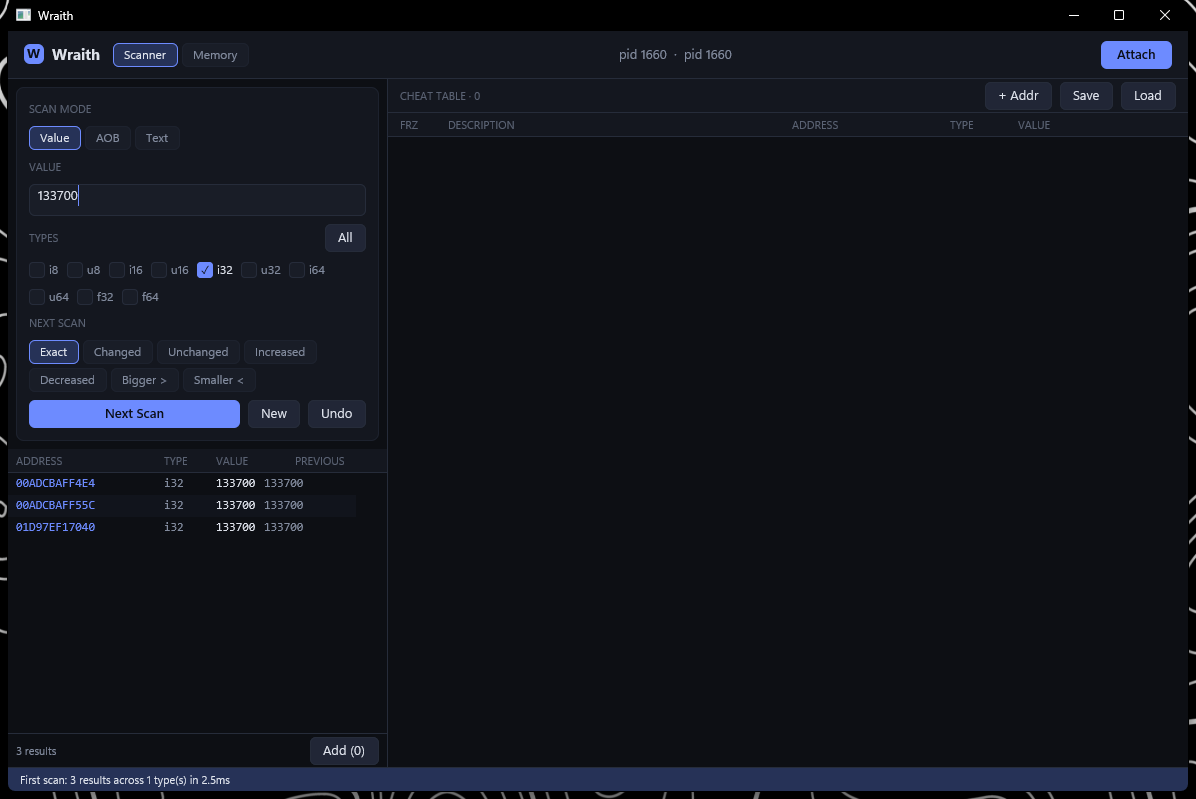
Wraith attaches to any Windows process and scans, edits, freezes and traces its memory — a fast, clean, modern take on Cheat Engine.

v0.1  ·  Windows 10 / 11 (64-bit)  ·  runs as administrator  ·  auto-updates
Wraith scanning a process
Everything you'd reach for

A full toolkit, not a toy

The whole scanning-to-editing loop, plus the debugger-grade extras — in one fast window.

Fast parallel scanning

Multi-threaded scans over the whole address space with SIMD-friendly kernels. Exact, unknown-initial, bigger/smaller, and next-scan refinement with undo.

Multi-type at once

Tick i8 · i16 · i32 · i64 · floats — any mix — and scan them all simultaneously. Results are tagged with the type they matched.

Pointer scanner

Builds a pointer map and finds static module+offset chains to your value. Relaunch, filter to the new address, repeat — narrow to the paths that survive.

Cheat table & freezing

Freeze values (hold / increment / decrement), rename entries, edit inline, save & load tables. Pointer entries re-resolve every frame.

Hex + live disassembly

A virtualized hex viewer beside a live x86/x64 disassembly. Click any row or line to copy it clean. NOP an instruction in place.

AOB & string search

Array-of-bytes signatures with wildcards, and text search across ASCII, UTF-8 and UTF-16 — case-insensitive.
Download

Two ways to run it

Same app either way — pick what fits.

📦

Installer · recommended

Installs to Program Files, adds Start-Menu & desktop shortcuts, and registers a clean uninstaller.

⬇ wraith-setup.exe

Portable

One standalone .exe — no install, no footprint. Run it from a USB stick, your Downloads folder, anywhere.

⬇ wraith.exe
Auto-update built in. Wraith checks for a newer version on launch — when there is one, an ⬆ Update button appears in the top bar and swaps it in a single click. No re-downloading, no reinstalling.
Three steps

Up and scanning in a minute

Download & run

Grab wraith.exe and open it. It self-elevates — accept the UAC prompt so it can read process memory.

Attach

Click Attach, pick your target from the process list, type a value and hit First Scan.

Narrow & edit

Change the value in-app, Next Scan to narrow down, then add hits to the cheat table to freeze or edit.

First launch: Wraith is not code-signed, so Windows SmartScreen may warn — click More infoRun anyway. It then asks for administrator rights (a memory tool needs them). It needs the Visual C++ runtime, which any machine that runs games already has.
Educational tool. Wraith is for learning reverse-engineering, debugging your own software, and single-player experimentation on systems you own. Use it responsibly and within each program's terms.

Ready to dig in?

~7 MB. No account, no telemetry. Updates itself.